Invoice Studio
Quotes, invoices, profitability. All in 1 standalone file.
Invoice Studio is a quotes and invoicing tool in a single standalone file. It runs on your device and stores your quotes, invoices and clients in your browser. Try it free for 7 days, then EUR 99 per year.
Nothing is charged during the trial. Then EUR 99 per year (VAT not applicable, art. 293 B of the French General Tax Code), cancel anytime.
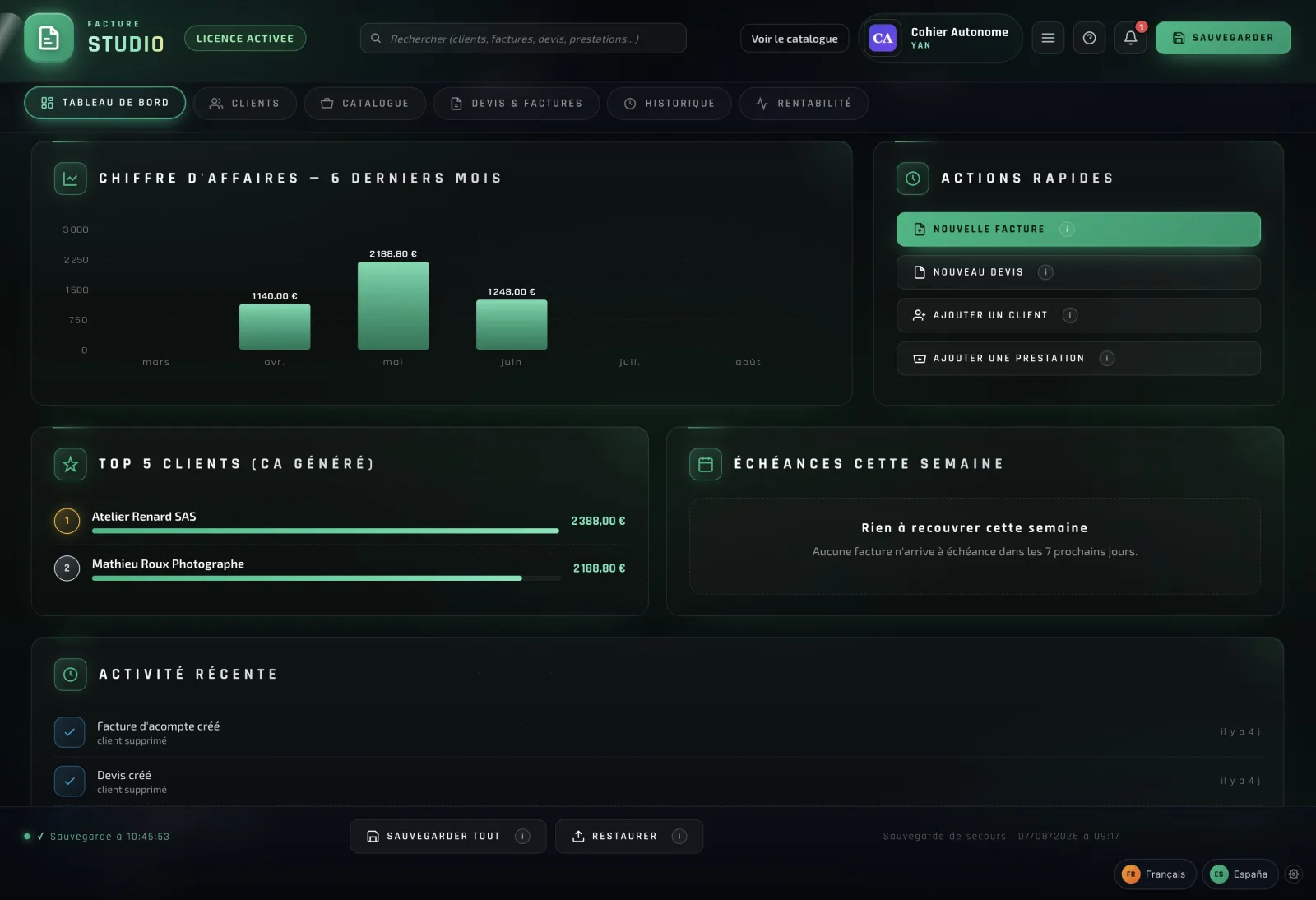
What is actually in the file.
Unlimited quotes and invoices
No document quota. The only limit is the space available in the browser: the studio warns you when it is running out.
Automatic numbering
Yearly sequence: F-YYYY-NNNN.
Profitability calculator
Hourly rate, costs, margin, net profit in real time.
Multi-client with address book
Complete contact details, invoice history per client.
Products and services catalog
Quickly reuse recurring lines.
Automatic VAT calculations
VAT configurable per line. Multi-rate.
Payment tracking
Paid, pending, drafts. Real-time view.
Data on your computer
Your quotes, invoices and clients are stored in your computer's browser; our server only sees the licence and the forms sent to your clients, whose answers are encrypted.
Multiple designs to choose from
Pick a visual template for your quotes and invoices.
Customizable
Logo, colors, terms of sale, legal notice.
Backup and restore
JSON export in 1 click. Import on another machine.
No audience measurement
No tracker, no telemetry, no tracking cookie in the studio. For the licence, it sends our server your key, the device fingerprint and the session; the server's technical logs are deleted after 90 days.
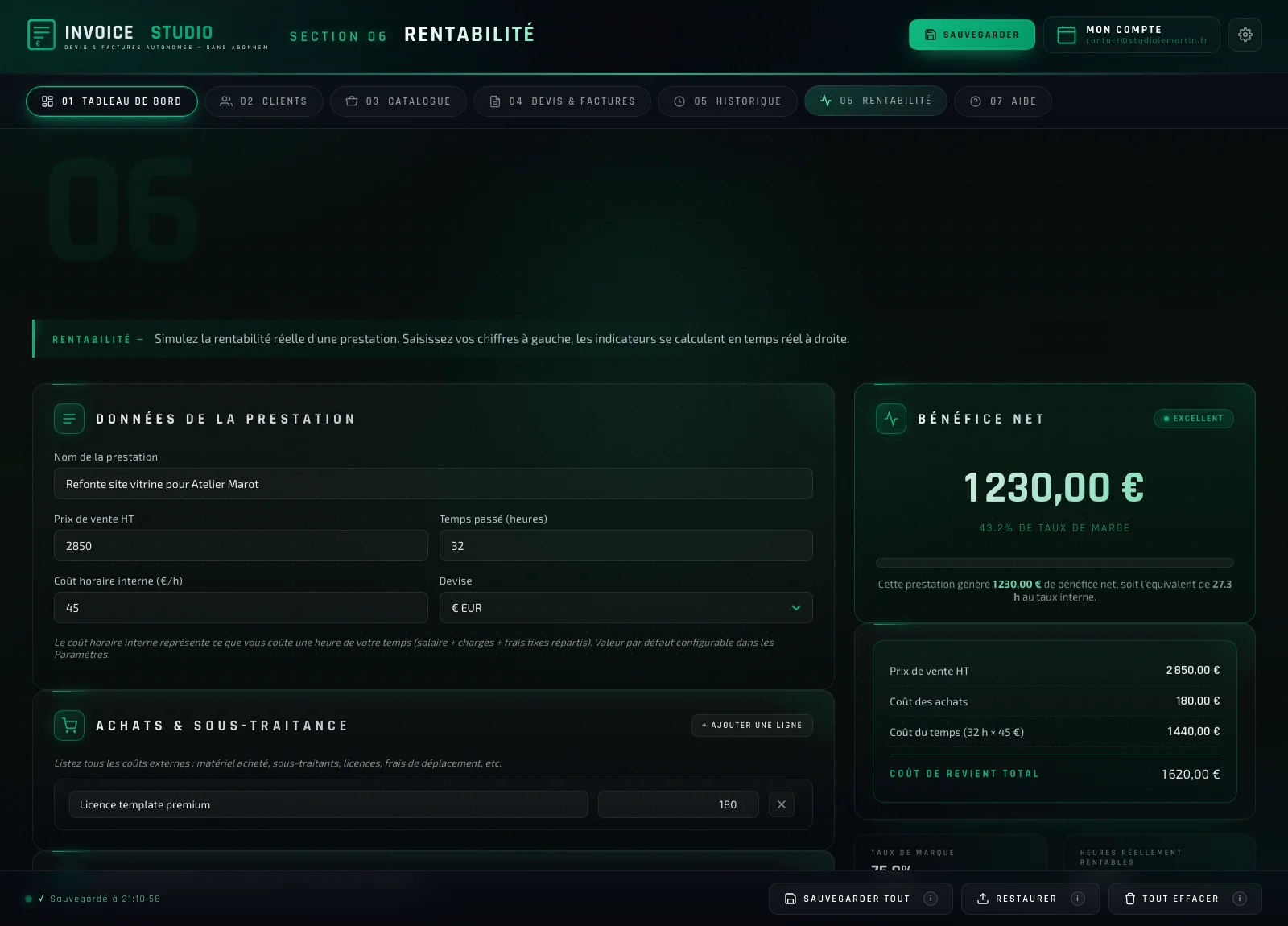
A built-in profitability calculator.
Before signing a quote, know if the job is really profitable. Enter your selling price, your planned time, your hourly rate, your purchase costs. Invoice Studio computes your net profit, your margin rate, your markup rate, and the real number of paid hours in real time.
- Configurable internal hourly rate
- Purchases and subcontracting accounted for
- Pre-fill from an existing invoice
- 10 currencies: EUR, USD, GBP, CHF, CAD, BRL, PLN, TRY, KRW, SEK
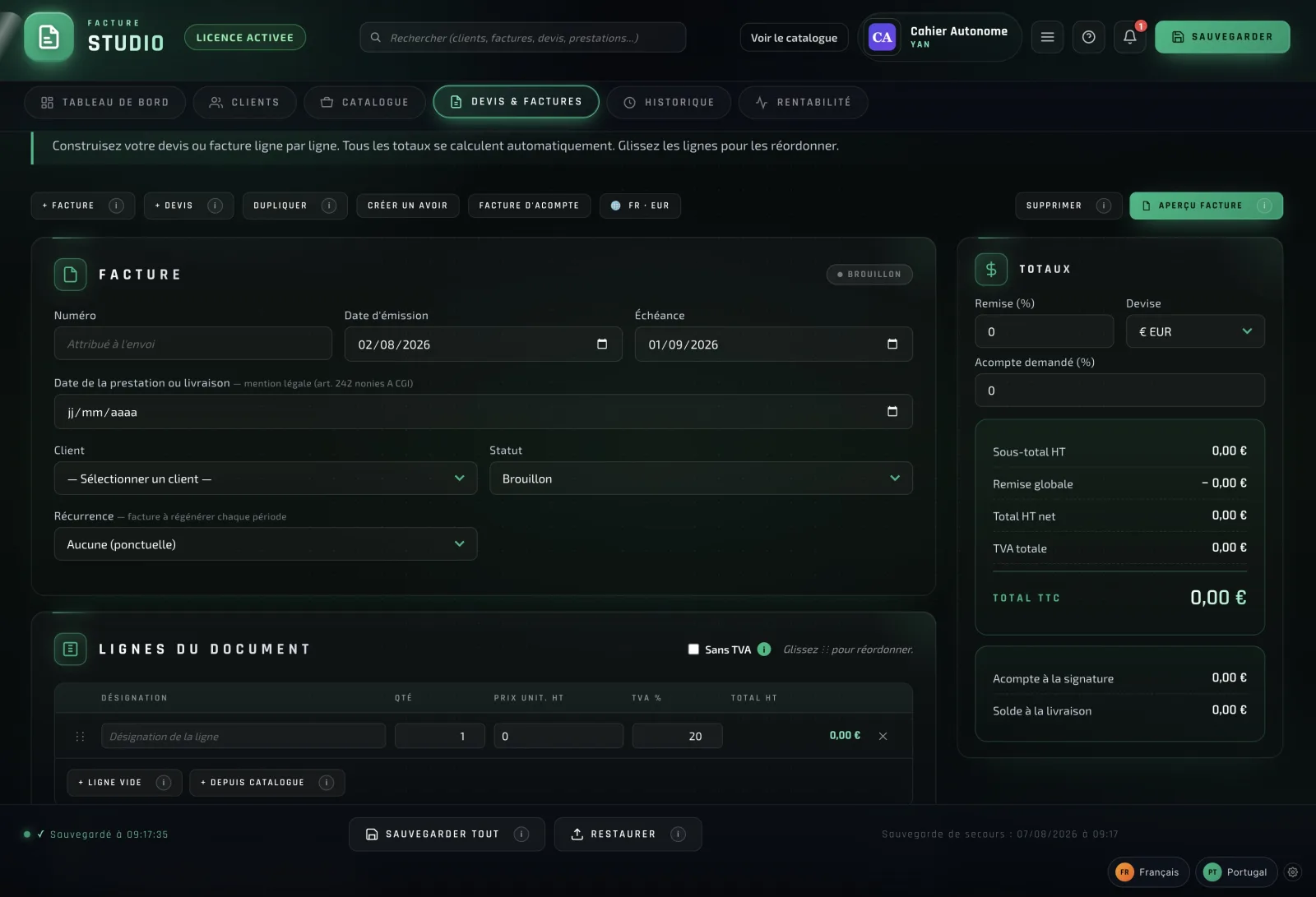
An editor that gets straight to the point.
No endless menus. No hidden features. You enter your client, your lines, your VAT rates, and you export your quote or invoice to PDF in less than a minute.
- Quote-to-invoice conversion in 1 click
- Auto numbering F-YYYY-NNNN
- Multiple designs to choose from
- PDF export of quotes and invoices
7 days free
Then EUR 99 / year
VAT not applicable, art. 293 B of the French General Tax Code
Works offline · Local data · Not SaaS
Nothing is charged during the 7-day trial. At the end of the trial, the EUR 99 annual licence is charged, then renewed automatically every year unless you cancel. No commitment: cancel anytime, and access stays open until the end of the period paid.
You manage or cancel your licence from the “Manage my subscription” button in Invoice Studio.
Start the 7-day free trialPayment method saved securely by Stripe at sign-up. Invoice Studio, your key and your download link arrive by email as soon as the trial starts. It is not an online service: the file runs on your device; it connects to our server for the licence and for the forms you send to your clients.
What is included
- Dashboard: paid, pending, drafts
- Unlimited quotes and invoices
- CII data file for each invoice
- Quotes and invoices in 11 languages (14 countries)
- Multi-client with full address book
- Client file import
- Products and services catalog
- Automatic VAT calculations
- Payment tracking and follow-ups
- Commercial profitability calculator
- Monthly target and history
- Built-in PDF export
- Accounting data export
- Multiple invoice designs to choose from
- Customizable
- Backup and restore in 1 click
- Works offline day to day
When the notebook connects
Invoice Studio runs on your device. It connects to our server in the following cases, and for nothing else.
On activation. The first opening requires a connection to check your licence key. Once activated, the key is stored.
During use. When online, the notebook checks from time to time that your licence is valid and that only one session is open at a time. Offline, it simply waits for the next connection: a network drop or a temporary outage of our server blocks nothing. Each successful check opens 15 days of use without a connection; beyond that, the notebook asks to be reconnected: your documents remain readable, printable and exportable, only data entry and issuing wait.
For updates. During that same check, the notebook compares its version to the one published. If a newer version exists, a "New version · Download" banner appears. You download and replace the file yourself. Nothing updates behind your back.
For client forms. When you send a client or a prospect a form to fill in, the form (your business name, legal notice, colours, logo) is placed unencrypted on our server. The answers come back encrypted, with a key the server never receives; the notebook retrieves them while it is open, then they are deleted from the server, at the latest after 7 days.
What never leaves. Your quotes, invoices, amounts, catalogue and client book stay in your computer's browser: they are never sent to our server. The notebook contains no tracker, no telemetry, no tracking cookie.
What Invoice Studio does not do
Invoice Studio is not an electronic invoicing platform. It transmits no invoice to a tax authority and does not replace an approved platform.
In France, from 1 September 2027, small and medium-sized businesses and micro-businesses will have to issue their invoices to businesses established in France through an approved platform (1 September 2026 for large and intermediate-sized companies). You must also designate one from 1 September 2026 to receive your suppliers' invoices: that is a registration, independent of the tool you use to issue them. Invoice Studio exports a CII data file for each invoice, to upload to your platform if it accepts this format: the platform does the transmitting.
If your business is established in one of the 13 other countries covered, Invoice Studio applies that country's legal notices to your documents, but produces no official national file (FatturaPA in Italy, FA(2) for KSeF in Poland, XRechnung in Germany, Facturae in Spain, UBL-TR in Turkey, NF-e in Brazil…) and connects to no national platform or Peppol network. Where business-to-business invoicing must go through one of them, it is not suitable for your professional clients: for your country, the studio states the official format it does not produce.
Sales to individuals: in France, they do not require an electronic invoice, but they fall under e-reporting: their data must be sent to the tax authority through an approved platform, including under the VAT franchise scheme, on the same schedule. Invoice Studio does not perform this transmission. In other countries, check with the tax authority.
Official sources (in French):
- impots.gouv.fr — À partir de quand suis-je concerné par la réforme de la facturation électronique ? (updated 16/01/2026)
- impots.gouv.fr — Mes clients sont à la fois des entreprises et des particuliers : par quel dispositif suis-je concerné ? (updated 16/01/2026)
- impots.gouv.fr — Franchisé en base, micro-entrepreneur ou auto-entrepreneur, suis-je concerné par la réforme de la facturation électronique ? (updated 28/09/2026)
Situation in France verified on 18 October 2026. In other countries, the rules must be checked with their tax authority.
Your questions, our answers.
What happens after my trial starts?
You immediately receive an email with your activation key and your Invoice Studio download link. You open the file in your browser: it works right away, with no account or installation. The 7-day trial starts immediately, and nothing is charged during this period.
How does the annual licence work?
Invoice Studio is offered under an annual licence: 7 days free, then EUR 99 per year (VAT not applicable, art. 293 B of the French General Tax Code), charged at the end of the trial and then at each yearly renewal date: the licence renews automatically unless you cancel. No commitment: if you cancel during the trial, nothing is charged; if you cancel after a payment, the licence does not renew and you keep access until the end of the period already paid. Afterwards, the studio switches to read-only: the backup, PDF and PNG files, printing, ZIP, CSV and accounting exports and the CII file stay available, and nothing is deleted.
How do I cancel?
From the “Manage my subscription” button built into Invoice Studio, which opens the Stripe customer portal. You cancel in a few clicks, without having to write to us.
Is it online software (SaaS)?
No. Invoice Studio is a standalone file that runs in your browser, on your device. Your quotes, invoices and clients are stored in your computer's browser, not in the file: your backup is a file you download. The studio connects to our server to check the licence and keep a single session open. When you send a form for a client to fill in, the form (your business name, legal notice, colours, logo) is placed unencrypted on our server; your client's answers come back through it encrypted, with a key the server never receives, and are deleted as soon as they are retrieved, at the latest after 7 days. The licence, the buyer's email address and the device fingerprint are processed to run the service. The studio contains no audience measurement. Server hosted by Hetzner (Germany), emails sent by LWS (France), payment by Stripe. The studio works offline day to day: each successful licence check opens 15 days of use without a connection. You export your data whenever you want.
Multiple machines, multiple collaborators?
Invoice Studio is built for individual use: one licence, one open session at a time. Your data is stored in the browser, not in the file: sharing the file does not share your data. To change computer or browser, make a backup on the old one, activate the studio on the new one with your code, then import the backup there.
Support and updates?
As long as your licence is active, fixes and new versions of Invoice Studio are available: when a version is published, the studio shows it in a banner, you download the new file and replace the old one; your data, stored in your browser and not in the file, stays in place. Support is handled by email, reply within 24 business hours.